26
Lightning Photography – A Primer
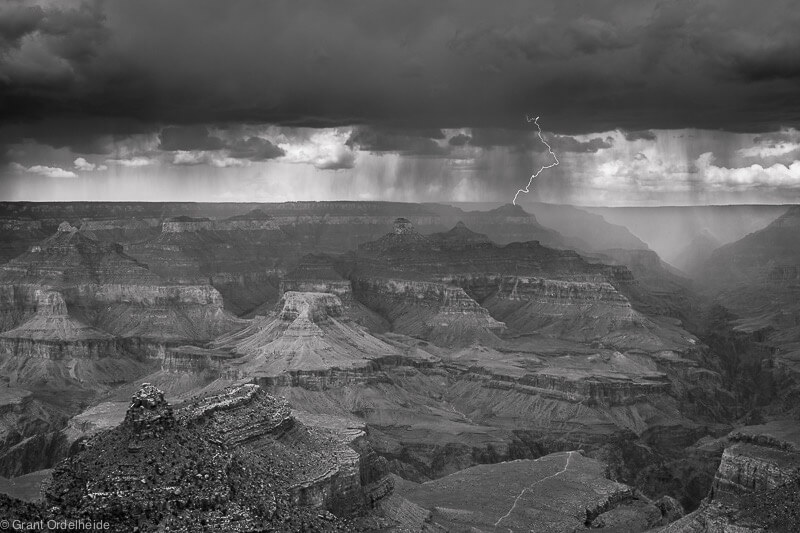
Photographing lightning can be very rewarding and produce very nice images that have a great ‘wow’ factor. Capturing images of one of the most powerful displays that God built into nature takes some planning and patience. This quick tutorial will show you how to use some basic equipment to translate a few million of watts of electricity into a few million pixels.


The Perfect Storm
First, a warning: Lightning can and will hurt you if you’re struck. If you think you’re too close to a storm, then you probably are. If the lightning and thunder are nearly simultaneous, then forget taking pictures. Lightning doesn’t have to hit you directly to be bad news. Even if you’re close to a tree that is struck, you can be hurt by flying splinters when the intense heat of the lightning instantly boils the sap in the tree and it’s trunk explodes. Ok, there’s my warning, take it or leave it.
Personally, I’ve only been in the right place & time for about 2 or 3 of these lightning shows. They are very beautiful to watch, and I think they show God’s majesty and might in a way that’s hard to ignore. First, it can’t be too cloudy or rainy between you and the bolts, or you’ll just get glowing clouds and fuzzy lightning. Having said that, glowing clouds and fuzzy lightning make for great shots as well, so you may want to see what you get anyways. To capture the clear bolts of cloud-to-ground electricity, you have to be in a place in relation to the storm where the wind and rain doesn’t get to you before the lightning show starts.
The Gear
1) Tripod
2) Camera: A Rebel XT was used in these examples, but any DSLR will work, and with some patience and trial & error, probably do it with a point & shoot like a Canon A series or Nikon Coolpix.
3) Cable shutter release: I got one for around 7 bucks on ebay. All you need is the one that has a simple shutter release button, and preferably one that can ‘lock’ the shutter button down for ‘bulb’ shutter mode.
4)Time: Each picture you take might take 30-60 seconds, so you must be patient, and wait for the lightning.
Getting the Shot
What you’re trying to do here is let the lightning be your flash. Think about a typical flash photo for a moment. Let’s slow time down and look at what happens when you push the shutter release button. 1) The shutter opens 2)The flash fires, exposing your sensor / film 3) The shutter Closes. I know that’s super-basic, and lot’s more goes on than that, but that’s all you need to know for this technique. After you get your camera on your ‘pod, use a distant street light to get a good focus, then switch to manual focus. Get your focus point using auto-focus, because most DSLRs aren’t set up very well for manual focusing, and it’s ten times harder to do in the dark, peering through the viewfinder.
Try starting with these settings. You will almost certainly need to adjust these, but I found this to be a good starting point. These are the settings I used with my Rebel XT:
Capture Mode: RAW
ISO: 100
F-stop: 13
Exp Time: 29 seconds
Focal Length: 30mm
Lens: 18-55 Canon AF-S
White Balance Temp: 4550K
Shutter speed: ‘bulb’
I set the ISO very low, so that I could keep the shutter open for 30 sec or more without overexposing the shot. The lightning is more than bright enough to give a great exposure at very low ISO speeds. Use a small aperture to get a crisp shot, even if your focus is off slightly. I generally shoot RAW in cases like this. Since you know you’re going to need to tweak things later, especially color balance, go ahead and shoot RAW.
Ok, now let’s leave camera-setting-world, and actually take some pictures of lightning. Once the lightning picks up to a reasonable pace, maybe 1 or two strikes per minute, push down, and lock the shutter button on the cable release to open the shutter, and wait. And Wait. And wait some more until you see a good bolt. As soon as you see a good bolt, release the shutter button to close the shutter. This may take as long as a minute or more, depending on your storm, but check each shot to make sure you’re not over-exposing.
Take a few 30 sec to 1 min exposures without lightning to make sure you’re in the ballpark for a correct exposure. With no lightning, you should see just a faint blue or purple glow in the sky, nothing very bright, and definitely not a bright blue or white sky. If you’re getting bright skies, raise your F-stop number, or lower your ISO sensitivity even further. If you capture some lightning, and it’s too dark, and you can’t see any color in the sky, lower your F-stop number, or raise your ISO sensitivity. Below are examples of what you’ll see if your exposure is off.

This is a bit overexposed. Very blown out, and all the definition is gone in the brightest parts of the bolt.

Properly exposed – you can see the glow of the sky and all the branches and detail in the bolt

This one is a little dark, unless that’s what you’re going for. The glow of the sky is gone, and only the brightest parts of the bolt are visible.
Take Lots of Photos
If you’re in a good storm, and your settings are working the way you want them to, start taking lots and lots of pictures. You never know when the perfectly shaped bolt is going to land, so as soon as you close the shutter and end one exposure, immediately start another one to be sure you’ll capture whatever is next. Don’t spend much time reviewing your shots, or you’ll miss the good bolts for sure. Save all the ooh and ahh for after the storm.
Time for Photoshop / Camera Raw Processing
Having other items in the shot for framing and giving a sense of scale. I like to have something silhouetted in the foreground to show just how freakin’ big these bolts are. It also gives the photos a little more composition by default. This always helps, since there’s no way to predict how the lightning will fill in the frame. I had to do some cropping in these shots to get a decent comp. Color Balance is another consideration. You want the night sky to look like a night sky, and not Mars or some weird brownish color. A different colored sky will give you a very different look and feel of the photo. This is why I recommend RAW, because you can change the color balance very easily and get just the color you want. Below are different color balance adjustments for the same image, each giving a very different effect.

This is close to what the sky looks like naturally

The warmer colors help give the lightning a hot, glowing appearance

… and a cool version
I hope you got something out of this tutorial, and I hope the rest of the summer is nice and stormy! Thanks for reading this, and if you found this helpful, leave a comment below.
Adam Bowman is a web developer and 3d artist from the rolling hills of east Tennessee. When not designing websites or creating 3D presentations, Adam loves to get out and photograph the natural world around us.
Website: acbstudios.com/portfolio
Flickr: adamcarsonb
Like Our Site?
26 Comments
-

arturo said:
very usefull tips! thanks!
-

Bill Jones said:
Your welcome! I’m glad your found it useful.
-

Tim McLeod said:
Saweeet Adam!
-

Vegard said:
Great tutorial!
The white color temperature doesn’t matter when you are taking raw photos, as you can change it later.
-

Asaad Saleh said:
check this out and other lightning shots:
http://www.flickr.com/photos/asaad_saleh/2056054697/ -

Markoel said:
I have caught allot of lightening on video in South Africa where we get plenty in Summer. I have never been fortunate enough to get still shots like this though. Very nice. I will be using some of these tips in the upcoming summer months. Let’s see what happens.
-

Gabriel said:
Hey Adam,
Thanks for the great tips there. I’ll definitely give lightning photography a try next time we’ve got a lightning storm.
Cheers,
Gabriel -

asdf said:
It’s also a good idea to use bulb mode. Keep the shutter open until a lightning strikes (or you know the sky will be too bright), then close it immediately. That way you won’t get multiple lightnings in one shot.
-

david smeaton said:
nice tutorial. it’s good that you explained the use of low iso. not only does that help you get longer exposures, but it also ensures that the photo is not grainy.
there are a few tricks that can be used to extend the exposure times. of course, stopping down the aperture works, but using neutral density filters will also help.
ideally, you only want a 30-60 sec exposure anyway …
in terms of aesthetics, i think it’s good to also mention that wider shots look better for lightning photos. a cityscape gives perspective to the size of the lightning strikes. conversely, an ocean or other water feature can create nice reflections … greatly improving the quality of the photo itself.
oh, and thanks for sharing your camera settings. i like it when photographers share their secrets ;)
cheers
david
-

-

sunil said:
Great information. Thanks. I will now wait for that perfect storm.
-

Steve B said:
A good rule-of-thumb for lightening distance is 1000ft/sec. Every second you count is about 1000 feet away (actually 1129). And remember that lightening strikes are essentially random. They may move in a general direction but can never be trusted.
-

David Jr said:
Awesome explanation on this. I tired capturing lightning one before but failed to do so. Also because I did not have a tripod with me. Next time around when the rainy season comes again, I will experiment using your theory.
Thanks,
David
http://www.jrhogan.blogspot.com (Travel Blog) -

robby said:
Is it just hobby or can we make money from lighting photography?
-

annamir said:
Lovely tutorial and sharing. Thanks from Malaysia.
-

Donna O'Sullivan said:
Absolutely superb! Thank you…. Can’t wait for the wet season now to go and practise.
-

Jay McIntyre said:
Thanks for the article. Very extensive. I captured my first bolts this summer http://jmphotographyonline.blogspot.com/2009/08/you-can-photograph-lightning.html
-

Myrta Mandala said:
Exelent,thanks for writing such an informative post. I have been readingyour blog for a last few days and enjoy the quality of your posts. It makes me want to start blogging myself. Do you have any words of wisdom for someone fairly new to the blogging world?
-

Kenneth Brown said:
Great article and nice images to compliment the information.
Here are a couple of mine that I took from different storms.
-

Tenee said:
Hey these are really cool shots, well done. Photoshop is amazing :-)
-

Theo said:
Great shots and very useful post, thanks
-

Mike said:
I greatly appreciate these tips and will try them out sooner than later. I moved from Los Angeles to Virginia a few years ago and brother….. they don’t know what lighning is out west hahaha. this stuff is unreal and happens quite often in the summer. I hope to get some great shots without being fried. Thanks again.
-

none said:
Another thing you can do is what I did; I built a photodiode lightning trigger based on a computer chip that I wired to my remote camera cord. It notices changes in light and snaps a photo. Living in Miami at the time it worked real good and cost about 30bucks parts. I moved north and haven’t had a opportunity to use it :-(
-

Linda said:
Thanks very much for this tutorial. Last night in the south (USA) we had the worst lightening storm I have ever seen in my 51 years! I have never seen such constant lightening before. And so blinding! Terribly scary. I tried to get pics but they were all overexposed. So as we are supposed to have another storm tonight I have my camera setting all set and ready to go. Thanks again, Linda
-

Tanweer said:
Very nice tips, I tried a lot but that all was over exposed. The bulb setting is a great idea to get it done just after the bolt, we are expecting storms in Pakistan, with lightening soon, I will share if get some thing, thanks again.
-

C. Diane said:
I have mine taken a month ago when we had a bad storm and I decide to go for a ride that way I can take a better photo of the lightening. It’s not easy as I had to wait for the right timing and I had it on my tripod plus my remote. There are several that I had it on Flickr. when it started to lightening around my home but I didn’t like the tree covers, then decide go over to the school house. Here is mine photo:
http://www.flickr.com/photos/7363677@N04/6018523620/
This one was taken up the front porch as I was holding the camera between my legs no tripod at this one….


Showcase Challenge: Fences
20 Outstanding Examples of Travel Photography
Techniques of Freezing Action in Digital Photography
Guide To Inkjet Digital Photographic Papers
Simple Rules for Composing Perfect Landscapes
14 Cool Examples of Tilt-Shift Photography
Tips for Perfect Portrait Posing
40 Stunning Photographs of Serene Sunsets
Photographer Showcase: Rivers and Streams by Chip Phillips
25 Wonderful Photographs of Rain
A General Look at Macro Photography
Making Sense of Cloud Storage Services for Photographers
The Golden Hour Portfolio eBook
Portraits of Strangers by Danny Santos
Showcase Challenge: Rain
16 Useful Photography Apps For Your Android Phone
The Breathtaking Beauty of Infrared Landscape Photography
What Is Photography and What It Means To Me