8
Get It Straight – Using the Photoshop Ruler Tool
To shoot unnoticed, I frequently hold my camera casually, at waist level, and shoot using my intuition and guesswork. Knowing where to aim, but not seeing through my viewfinder or LCD, gives me uneven results and I have to make some corrections for the photo to look good. Here are two simple tricks – Ruler and Crop:
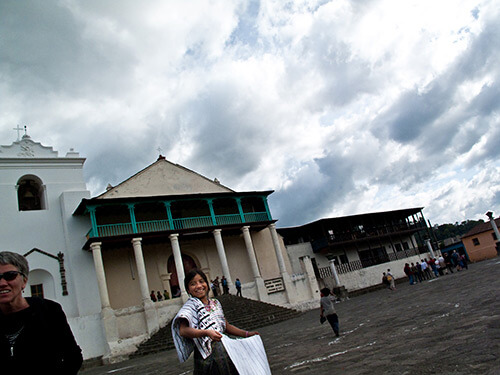
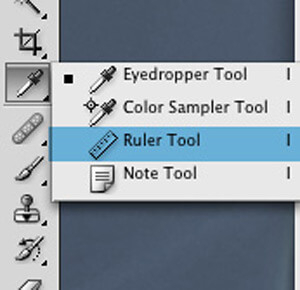
1.Feel free to save the image above and follow along – let’s level out this scene first by going to the measure tool. It’s hidden under the eyedropper dialog, so click and hold to reveal the submenus and select the Ruler Tool (remember, you’ve done this, otherwise you may not be able to find your eyedropper tool the next time you need it).
2.Click and drag your ruler across a good vertical (or horizontal) straight line near the middle of the photo. If you don’t have a usable straight line, make a good guess. In this case I’m using the columns on the church in the background. Once you’ve done this…
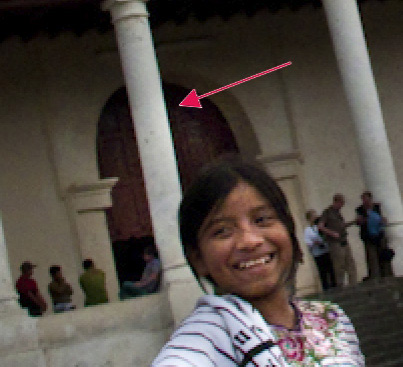
3.Simply go to Image/Image Rotation/Arbitrary and you will get a dialog box with a number already in it.
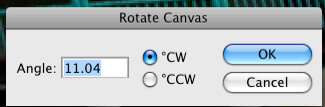
Photoshop is telling you that it believes this change in angle will make the ruler line you made in your picture a straight. It usually does a very good job, but don’t be surprised if you get unexpected results. If you do, pick another straight line (don’t pick the same line) and try again until Photoshop (it’s not you) gets it right. Select OK, and this is the result:
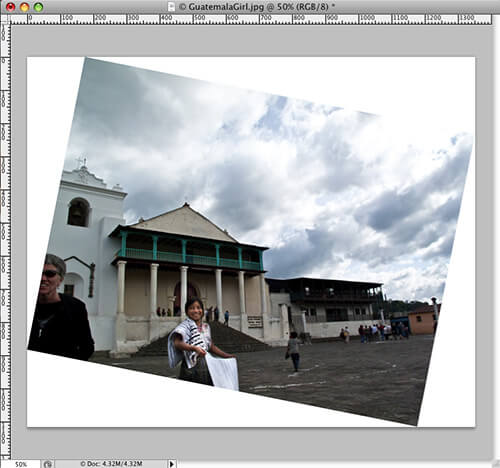
4.Finally, this image needs to be cropped. Using the rule of thirds, which has been covered on PA with some terrific examples, let’s crop this puppy. I would like the girl to be in the lower left third, so I can keep the flavor of my background scene. You can measure this out or simply eyeball your thirds out.
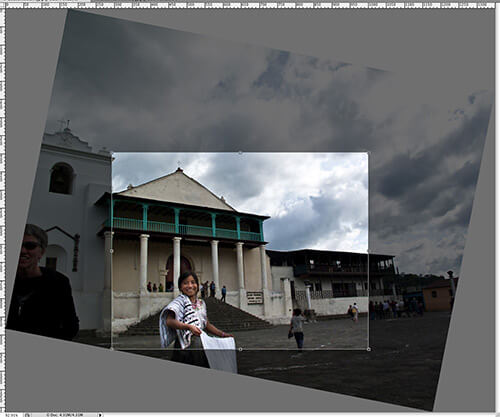
5.And, here is the final result, a nice vacation photo without all the mess.


D.A. Wagner has been a photographer, owner of a flash rental company, a photographer, co-owner of original Photo District News, a photographer, founder of a Virtual Reality production company, a photographer, a designer and owner of a greeting card company, a photographer, a custom picture framer, and a photographer.
Website: www.dawagner.com
Like Our Site?
8 Comments
-

Amberly | Web Designer said:
Awesome effect
-

Jin said:
Why not just use Photoshop’s vertical/horizontal guide’s?
-

Bill Jones said:
The ruler tool is a more precise way of doing it. As the tutorial illustrates, your able to “sample” known vertical elements within you’re image with the ruler tool and get and exact degrees the canvas needs to be rotated to get that vertical element actually vertical.
-

kyle steed said:
Brilliant! Thanks so much for the tip. Just saved my butt.
-

francisco nix said:
thanks good to know
i bet that photo was taken in guatemala… I know it because i’m from there xD
-

Gouri said:
That was really helpful. Is there a way to get the ruler closer to the image?
-

Vance said:
I liked it better crooked! Especially in the banner shot at the top of the story. Actually good to know about the ruler in PS. I usually straighten and crop in camera raw.
-

Dave said:
If you use Picasa it will crop perfectly as it rotates live via a slider and a grid helps you line it up. When you’re done you can move on to crop to get exactly what you want. Takes seconds, keeps your original saved, and it’s free.
I like PS but there’s some things that it’s just too big to do quickly.


Making Your Wedding Photography Stand Out
Showcase Challenge: Fences
20 Outstanding Examples of Travel Photography
Techniques of Freezing Action in Digital Photography
Guide To Inkjet Digital Photographic Papers
Simple Rules for Composing Perfect Landscapes
14 Cool Examples of Tilt-Shift Photography
Tips for Perfect Portrait Posing
40 Stunning Photographs of Serene Sunsets
Photographer Showcase: Rivers and Streams by Chip Phillips
25 Wonderful Photographs of Rain
A General Look at Macro Photography
Making Sense of Cloud Storage Services for Photographers
The Golden Hour Portfolio eBook
Portraits of Strangers by Danny Santos
Showcase Challenge: Rain
16 Useful Photography Apps For Your Android Phone
The Breathtaking Beauty of Infrared Landscape Photography